Bring your Google Gemini key. AI needs internet, phone battery and mobile credit.
TaxiConnect
YOUR NEXT FARE. THEIR NEXT STORY.
Take a taxi job.
Follow the pickup pin and meet a passenger with their own personality, voice and accent. Calls, stories and small requests give every trip its own character.
Optional seated models support the listed ATS Road Trip cars.
YOUR ATM CARD
Small moments. Real interactions.
At the shop, the reader appears before the card tap and your PIN. Get approval and collect your receipt; fuel keeps its own payment flow.
STEP OUT & EXPLORE
There’s life outside the cab.
Explore in first or third person. Walk, run, jump, climb reachable edges and take your torch out after dark.
MORE WAYS TO MAKE IT YOURS
Beyond the driver’s seat.
A character to explore with. A trailer to prepare. A place to rest when the day is done.
Concept artwork · character exploration
FIRST PERSON. THIRD PERSON. YOUR CHOICE.
Put yourself in the journey.
Pick your character, including Lucia or covered North, and step into the world outside. Switch between first- and third-person views as you walk, run and explore in both games.
Your selected character, with a full-body third-person view
Climb reachable truck edges and vault suitable boundaries
Jump onto lower vehicle surfaces and hear metal footfalls
First person shows your torso, legs and feet when looking down. Traversal needs usable collision and a clear landing; not every decorative surface is climbable.
Character and camera compatibility
Use the current plugin and matching generated character/map assets. Cabin walking and rest use the selected character; the space and camera clearance depend on the truck. Entering the cab returns to the first-person driver view. Third-person characters do not imply shared Convoy avatars.
Concept artwork · manual trailer preparation
PREPARE IT. CHECK IT. DRIVE IT.
Make trailer work part of the job.
Work through coupling and uncoupling with hoses, cables, the wheel pin and landing gear. Follow the current step and its interaction marker, complete the tug test, and collect your delivery papers.
Landing-gear movement with timed crank motion
Step markers and guidance toward the interaction
Bill-of-lading paperwork for delivery jobs
Manual actions need compatible game hooks and a supported trailer setup. A failed action stays on its step so you can check the reason and retry.
Concept artwork · cabin comfort
A LITTLE COMFORT BETWEEN SHIFTS
Make the cabin feel lived in.
Walk inside while parked, settle onto the bunk and keep your character in view through the sleep sequence. Bring a usable pillow, blanket and fan before taking a cabin nap.
Eye-close and wake-up sequence with character-matched audio
Adjust roof-lamp position and side/window light
Seated and reclined body views, with return-to-seat recovery
Cabin light, colour and spread are adjustable per truck. Interior space, glass materials and body clearance vary by cabin.
THERE’S A WORLD OUTSIDE THE WINDSCREEN
Make the stop part of the story.
Walk outside, refuel, pay by card and explore after dark. Follow a moment from your next stop.
Step outsidePark safely
Concept feature artwork
LIFE OUTSIDE THE CAB
Park. Step out. Explore.
Leave your truck or car with your configured key. Walk, run, crouch and jump around your stop. Choose Left Hand Driving or Right Hand Driving in Settings for your exit side.
1Park safely
2Leave the cab
3Explore on foot
Steps and footsteps make getting out feel part of the journey.
Story preview · Park safely
A LITTLE LIFE BETWEEN THE MILES
Your journey. Your needs.
Move through a stretch of road and watch your reserves change. A small website preview; your game stays untouched.
Bladder reserveHigher means more time before your next toilet break.
ONE STRETCH AT A TIME
Miles have a meaning.
Your last stopTime for a break
Parked500 km
Find your own rhythm: drive, stop, recharge, repeat.
Simplified distance preview. Discover the shops, equipment and everyday rituals in the game.
CHECK IN WITH YOURSELF
Ready for the next stretch?
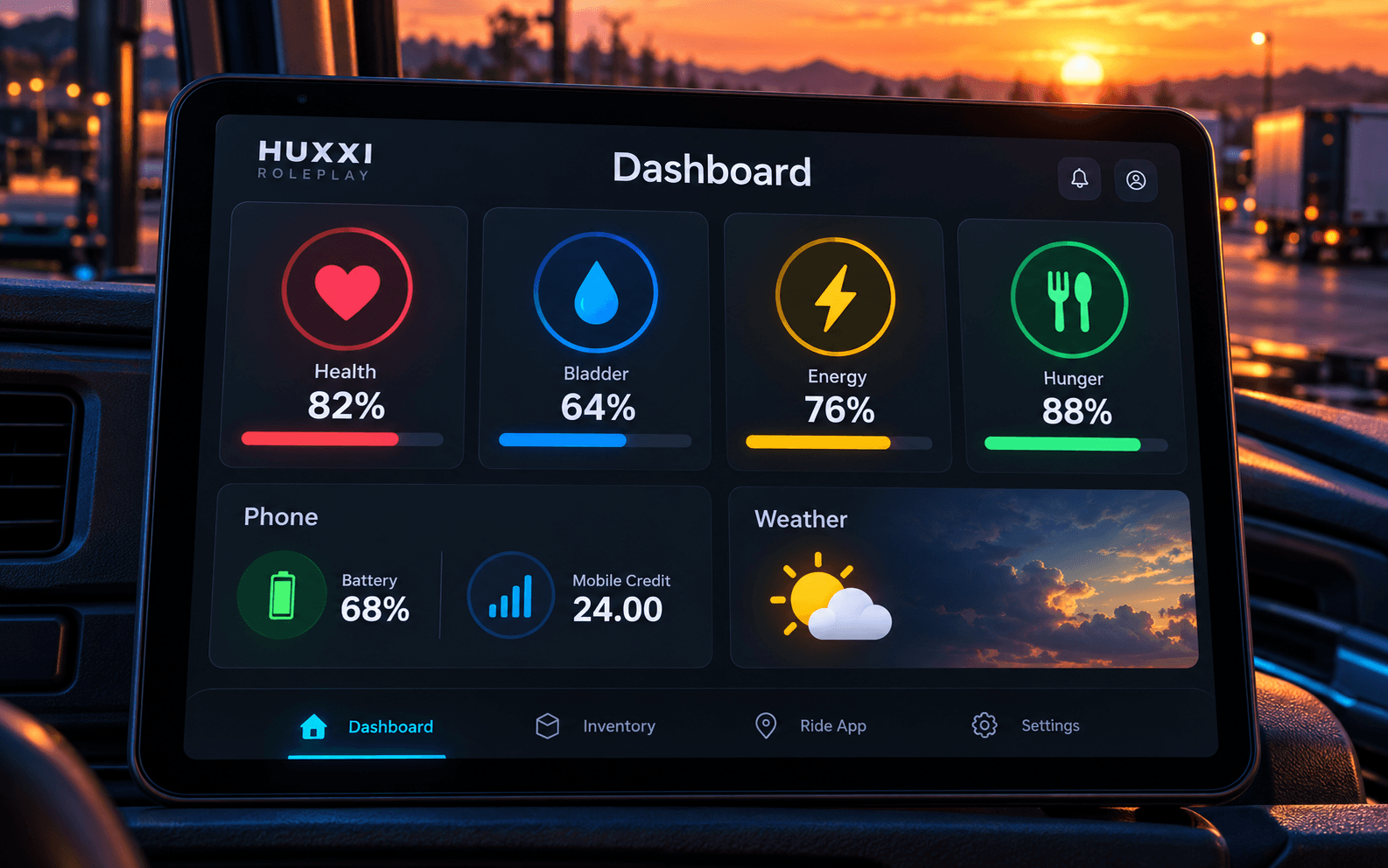
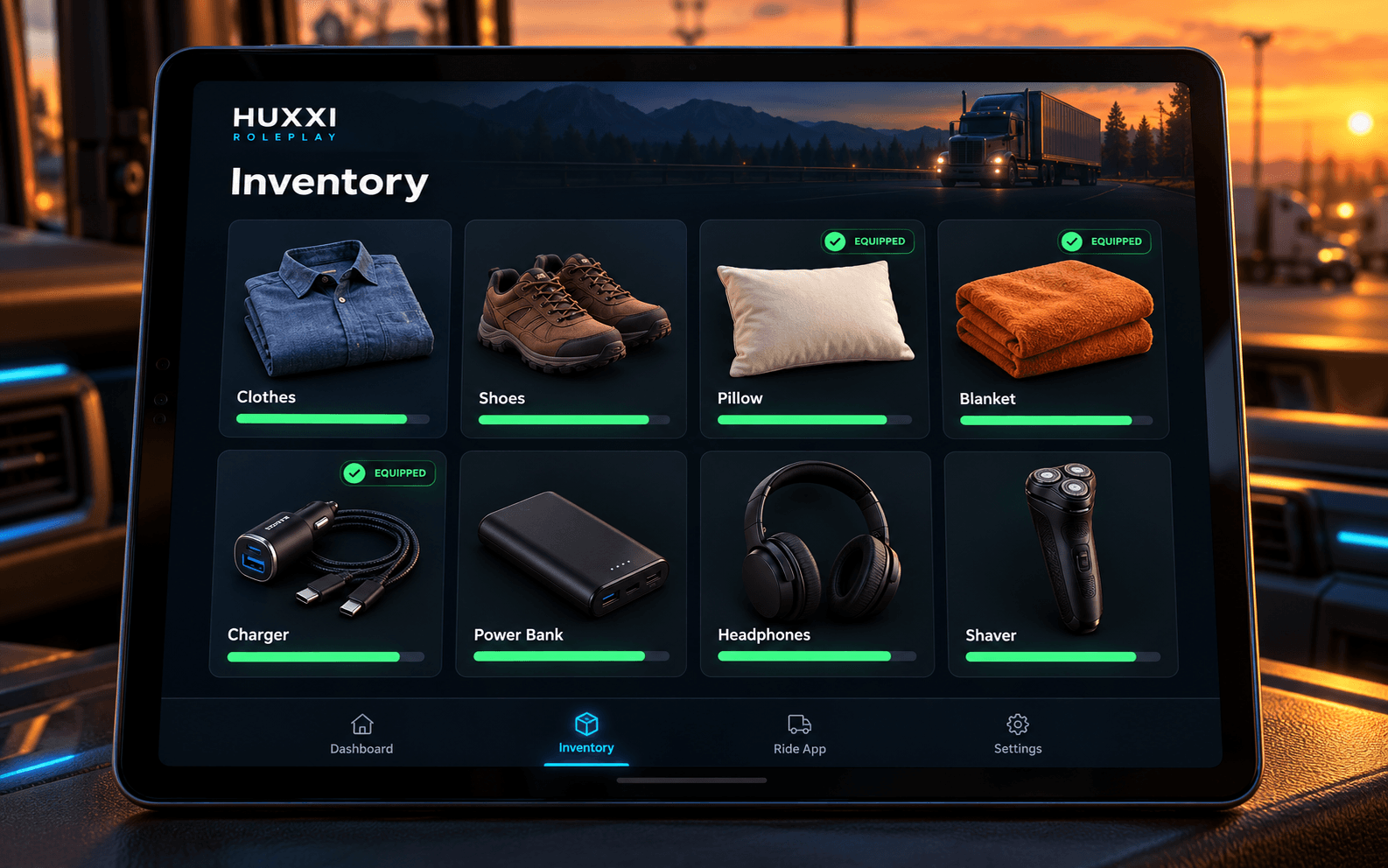
Your dashboard shows what you need. Your inventory holds the essentials that stay with you.
Your day, at a glance.
Health, bladder, energy and hunger in their familiar colours, with phone battery and credit close by.
Bring your essentials.
Clothes, shoes, bedding and phone accessories stay equipped. Check their condition; replace broken items.
Concept illustrations inspired by the in-game tablet. Example values shown.
DIFFERENT PEOPLE. DIFFERENT STORIES.
More than a voice on the road.
Natural pauses, different personalities and a useful companion when you need one. Choose the voice and response language that suit your journey.
FRIENDLY & COOPERATIVE
“That little café looked good. Do you ever stop there?”
Warm and considerate, with personal opinions and gentle humour. Their story unfolds as you talk.
Illustrative dialogue. Actual replies are generated for your ride.
A voice with a personality.
Compatible voices and accents rotate between rides. Front-seat speech comes from the passenger side; rear-seat speech keeps a rear-cabin impression. A personal call may include a faint caller’s opening line.
Room for quiet moments.
Choose Quiet, Normal or Chatty. Conversation starters are spread through the trip, and requests can reflect age, personality, weather and time of day.
A journey with surprises.
A friend to pick up, a passenger dozing off, a forgotten item to return, or a compliment after a smooth drive. Optional events vary between rides.
What happens naturally during a ride?
Passengers may make a personal call, request a short service stop, change their destination or ask to return. Small comfort requests include a charger, an open window, music, cabin temperature, quiet rest or gentler driving. These requests do not automatically operate vehicle equipment.
A confirmed collision or extremely close vehicle gets priority over casual conversation. Reactions reflect severity and personality; repeated collisions matter more, and a calmer stretch can help a startled passenger settle.
Compatible Google voices, age and accent instructions shape delivery. Live responses need internet and available API quota. Phone and cabin effects are stereo approximations, not head-tracked surround.
THE LITTLE THINGS GET NOTICED
A better ride. A better rating.
Your passenger remembers how the journey felt. See the feedback, then make the next trip your best one.
ILLUSTRATIVE RIDE SUMMARY
5.0 / 5
A smooth journey.
Clear feedback. A fare breakdown. Your last five rides in Job history.
Example layout · ratings depend on the actual ride
More than reaching the destination.
Ratings take account of collisions, confirmed fines, missed requested stops and hygiene. Repeated harsh driving can matter too, with allowances for smaller mistakes. Tips reflect the rating and the passenger’s personality.
Check Job history for the route, passenger report, rating factors, fare, tips, bonuses and deductions. A returned forgotten item can add a reward to that ride.
A decimal rating and a reason after drop-off
Occasional friend pickups, personal calls and forgotten items
Quiet, Normal or Chatty conversation settings
Your own driving licence.
Add a local photo, your name and company in Settings. The redesigned card carries that identity into the game.
A stop along the way.
Ask for a service ahead. An orange second pin keeps your main destination in place while guiding you to the stop.
Less waiting. More driving.
Tablet redraws, payment timing and routine ride saves have been refined to reduce unnecessary work and improve responsiveness.
Accessible places from all six categories, plus fuel and repair stations, can be TaxiConnect endpoints. Bus stops provide discovery and rides, without a shop interaction.
TWO WORLDS. ONE ROLEPLAY EXPERIENCE.
Made for your journeys.
Download one installer for both games. Generate a compatibility pack for your existing map setup and keep a separate setup for each profile.
EUROPE
Euro Truck Simulator 2
One installer. Generate a Huxxi compatibility pack from the maps used by your profile.
Base, official DLCs & selected mod maps
Generate your map compatibility pack
Use Huxxi Roleplay Installer to generate markers for recognized restaurants, toilets, stores, hotels, rest stops and bus stops from your current map setup. Includes the standard game, installed official DLCs and selected mod maps such as ProMods.
Your existing working map setup and its required dependencies
Mod Manager priority · highest first
One matching Huxxi Roleplay Map Compatibility pack
Your original map mods and connectors in their required order
The installer installs the pack and matching data automatically. Disable old Huxxi icon packs and add-ons. Regenerate after changing maps, load order or game version.
Base and modded profilesKeep separate named setups
One installer. Generate a Huxxi compatibility pack from the maps used by your profile.
Base, official DLCs & selected mod maps
Generate your map compatibility pack
Generate the same everyday-stop markers from your American map setup, including installed official DLCs and selected mod maps such as Reforma or ProMods Canada. Unrecognized custom service models may have no marker.
Your existing working map setup and its required dependencies
Mod Manager priority · highest first
One matching Huxxi Roleplay Map Compatibility pack
Your original map mods and connectors in their required order
The installer installs the pack and matching data automatically. It follows your load order; it does not repair an incompatible map combo or install its source maps.
Real Cab Passengers
Ten passenger appearances for TaxiConnect. A rider occupies a supported seat during the ride; an occasional friend pickup can use another seat. Includes animated Ada and Tifa appearances.
Road Trip · Bronco, F150, Mustang or Crown Victoria
Mod Manager priority · highest first
Real Cab Passengers
Supported car and accessory packages
Download this optional pack separately. Fit TaxiConnect Seats in the interior upgrade shop and confirm the purchase. Other cars need a supported fitting.
Base and modded profilesKeep separate named setups
Third-person characters and manual gameplay use the shared plugin in both games. Visual taxi seating has separate vehicle requirements. Download Huxxi Roleplay Installer from Patreon. Generated packs need their original maps and dependencies. Recognized model coverage and AI road navigation vary by setup; check the release notes for current compatibility.
REAL CAB PASSENGERS
A face to go with the conversation.
Gender-matched appearances become visible when a rider boards and leave with the passenger. An occasional friend pickup can occupy another supported seat. ATS supports Road Trip’s Bronco, F150, Mustang and Crown Victoria with TaxiConnect Seats fitted at the interior upgrade shop.
The Euro Truck Simulator 2 model library is prepared for future car fittings; it does not place riders in cars yet.
TAB does not open the tablet. What should I check?
First load your actual driving profile and return to gameplay. TAB will not behave as the tablet shortcut while another menu owns input. Check the current plugin is installed in the selected game, activation is valid, and both required game settings are enabled.
Close ATS and ETS2 before installing or repairing files.
In the installer, select the correct game and use Install plugin. Avoid duplicate old Huxxi plugins.
Under Settings → Game fixes, enable console/developer mode and run Fix tablet keyboard.
Restart the game and load the intended profile. If TAB still fails, use the controls.sii check below.
Is the keyboard setting sys.keyboard or keyboard.sys in controls.sii?
The correct device name is sys.keyboard, not keyboard.sys. Some affected profiles use di8.keyboard, which can prevent the tablet keys from working. The installer’s Settings → Game fixes → Fix tablet keyboard changes that device entry and keeps a one-time backup.
Close the game so it cannot overwrite the change.
Prefer the installer repair. For a manual repair, back up the active profile’s controls.sii first.
In a readable text controls.sii, replace the exact device text di8.keyboard with sys.keyboard. Keep the surrounding syntax and other bindings unchanged.
Restart and load that profile. Do not try to edit an unreadable/binary file as text.
Shop icons are missing. What load order should I use?
Generate a compatibility pack before expecting Huxxi locations. In that profile’s Mod Manager, put exactly one matching Huxxi Roleplay Map Compatibility pack at the TOP, above its source maps. Disable older Huxxi icon packs and add-ons; keep the original maps and dependencies below it in their authors’ required order.
Load the intended profile once, then close the game.
Select the correct game/home in the installer and choose Find my maps.
Review the sources, then Generate & install for that setup.
Enable its matching pack at the top of that same profile. Do not enable several generated packs together.
I can see a shop icon, but cannot interact with it.
The map pack supplies locations; the activated gameplay plugin handles interactions. Check that both are installed and the matching generated data is available. Walk to the actual interaction area and use your saved shop key when prompted. A bus-stop icon is a discovery/pickup point, not a shop. Reviewed coordinates do not guarantee a measured doorway for every custom building.
My taxi passenger is talking, but the seat is empty.
TaxiConnect conversation alone does not fit a visible rider into every car. On a supported ATS Road Trip car, you also need the optional Real Cab Passengers companion and the TaxiConnect Seats accessory.
Enable Real Cab Passengers above the supported car/accessory packages in the active profile.
Use a supported Road Trip Bronco, F150, Mustang or Crown Victoria.
Visit the interior upgrade shop, add TaxiConnect Seats to the car and CONFIRM the purchase.
Start an eligible TaxiConnect ride and wait until boarding finishes. A passenger is not permanently shown between rides.
How do I update without losing settings or saves?
Close both games and use Install plugin for the intended installation. Normal installation preserves saves, activation and preferences. Keep your own profile backup. Generate again only for a changed game/map/load order or an older incompatible data format; enable the matching pack afterwards.